
How to Change Location on Rednote? Add Location On Your Profile and Post Guide[Rednote Nearby]-copy
How to change location on Rednote?How to explore Rednote nearby content, attract target audiences, and customize posts after creating Rednote account? This guide covers adding location to your profile, changing post locations and regions for seamless updates. Boost your Rednote engagement with location flexibility!


Part 1. Can You Change Location on Rednote?
Yes, you can change your location on Rednote, and it’s a feature that can benefit both casual users and influencers alike. Here are the key reasons why you should consider changing your location:
- Change Location to View Nearby Content: When you change your location on Rednote, you can access and interact with content from other regions.
- Continue Posting Location-Specific Content After Leaving the Area: Rednote restricts posts to nearby locations, meaning you can only share posts related to businesses or areas close to you. However, by changing your location, you can continue posting content relevant to a region even after leaving it.
- Attract More Targeted Users: If you're trying to grow your Rednote presence in a different market or region, changing your location can significantly increase your reach.
- Enhance Content Differentiation: By adjusting your location, you can align your content with local trends or topics.
Part 2. How To Add Location On Your Profile On REDnote App?
Adding your location to your Rednote profile is simple and can make your profile more discoverable. Follow these steps:
- Go to Your REDnote Profile: Tap on the "Me" icon at the bottom right of your screen to open your profile.
- Edit REDnote Profile: Once on your profile page, tap on the "Edit Profile" button.
- REDnote Add Location: Scroll down until you see the "Location" field. Here, you can add your desired city or region and save your changes to update your profile.


By adding your location to your profile, your posts and account will be associated with that area, increasing visibility for local users.
Part 3. How To Change Location On Rednote Post?
Changing the location of your Rednote post is a highly effective way to increase engagement and target specific audiences. This feature is especially useful for influencers, businesses, and users who want their content to appear relevant to specific regions. Below, we’ll explore two popular methods to change the location of your Rednote post, along with step-by-step guides, pros and cons, and related pictures for clarity.
Method 1: Change “Mark Location”-Using iAnyGo GPS Location Changer
The "Mark Location" feature on Rednote allows you to tag your posts with a specific place. Using tools like iAnyGo, you can spoof your GPS location to tag places even if you’re not physically there.
Steps to Change REDnote "Mark Location":
- Download and Install iAnyGo: Download iAnyGo on your computer and install it. Connect your phone to your computer using a USB cable.




- Launch the Tool: Open iAnyGo and select "Change Location" mode from the main interface.
- Select Your Desired Location: Enter the location you want to set for your Rednote post in the search bar or manually pin it on the map.
- Change GPS Location: Click "Start to Modify." Your phone's location will now be updated to the selected location.
- Open Rednote and Post Your Content: Open the Rednote app, create your post, and use the updated "Mark Location" to tag your content with the new place.
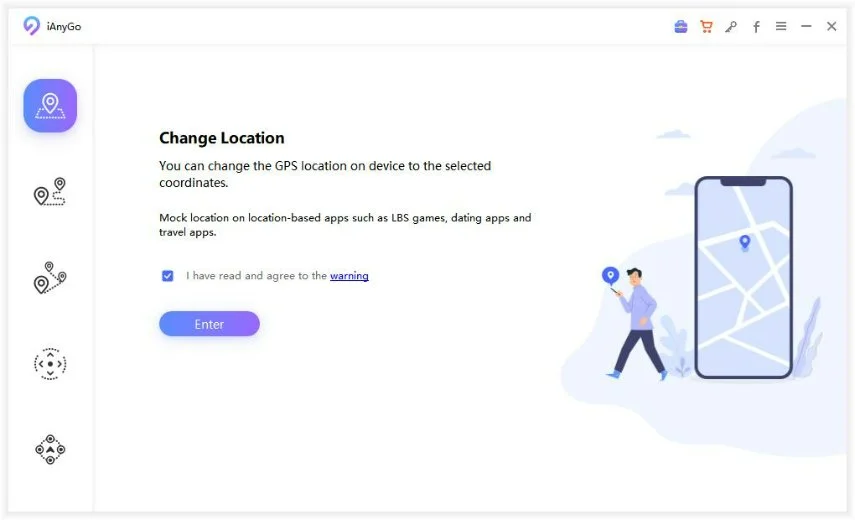


Simple and user-friendly tool. Allows you to tag any location worldwide. Great for targeting specific audiences.
Pros:
- Simple and user-friendly tool.
- Allows you to tag any location worldwide.
- Great for targeting specific audiences.
Cons:
- Requires a PC or Mac for initial setup.
Method 2: Change “Post” IP Location-Using VPN IP Location Changer
VPNs (Virtual Private Networks) are another method to change your location by altering your IP address. This method is useful when Rednote uses your network’s IP to determine your location.

Steps to Change "Post" IP Location:
- Download a Reliable VPN: Install a trusted VPN service like NordVPN, ExpressVPN, or Surfshark on your device.
- Select a Server in Your Desired Location: Open the VPN app and connect to a server in the region where you want your post to appear.
- Verify Your IP Address Change: Use a website like "What’s My IP" to confirm that your IP address reflects the new region.
- Open Rednote and Create Your Post: Once your IP is updated, open the Rednote app, and create your post. Rednote will automatically associate your post with the new region.
Easy to use on mobile devices. Effective for IP-based location changes. Offers additional online privacy benefits.
Pros:
- Easy to use on mobile devices.
- Effective for IP-based location changes.
- Offers additional online privacy benefits.
Cons:
- May slow down your internet connection.
- Free VPNs might have limited server options.
- Not suitable for changing precise "Mark Location" tags.
Comparison of Two Methods
 Please swipe to view
Both methods have unique advantages, and the choice depends on your specific needs. If you want to target a very specific place for your Rednote post, the iAnyGo GPS location changer is your best option. On the other hand, if you prefer a simpler method that doesn’t require a computer, using a VPN is an effective alternative.
These tools not only help improve your content’s reach but also make your posts appear more relevant to specific audiences, giving you an edge in growing your Rednote profile.
Part 4. How to Fake Location on Rednote? Change Rednote Region
If you want to fake your location on Rednote, tools like iAnyGo can help you change your location across different sections of the app, including your profile and posts. Here's how iAnyGo can help:
Use iAnyGo to Change Location on Your Profile
With iAnyGo, you can easily change the location set on your profile page, making it appear as if you are based in a different region. This can help you access location-specific content and engage with a broader audience.

Modify Your Location for Rednote Nearby
iAnyGo can also change your location for Rednote's Nearby feature, helping you explore content from other regions or interact with users in specific areas.

Post Location Changes
In addition to changing your profile and Nearby location, iAnyGo allows you to modify the location tag on your posts, ensuring that your content appears geographically relevant even if you're not physically in that location.
Part 5. How To Change Location On Rednote Nearby? Best China Coordinates for Influencer
Changing the location for the Nearby feature on Rednote allows you to discover content and interact with users in different regions. Here’s how you can adjust your location for the Nearby tab:
Explore Nearby Content
Open the “Explore Nearby” tab in the Rednote app. You will see posts and users that are located near your current location.

Zoom In/Out on the Map
Use the map to zoom in or out and select a different area. You can tap on any region to explore the content from that location.

If you're looking for a reliable and easy-to-use tool for changing your Rednote Nearby location, iAnyGo is the perfect solution. Try it today to enhance your Rednote experience and maximize your reach.
Best 8 China Coordinates to Fake in Rednote Location
When using location-changing tools like iAnyGo to alter your Rednote location, here are eight popular coordinates in China, Hong Kong, and Taiwan that can help you simulate being in different regions. These coordinates are especially useful for targeting specific areas or exploring local content.
- Tuen Mun, Hong Kong SAR, China: 22.391531, 113.977364
- HK Macau Ferry Terminal, Hong Kong SAR, China: 22.288486, 114.151924
- Central, Hong Kong SAR, China: 22.286542, 114.155724
- West Kowloon, Hong Kong SAR, China: 22.304304, 114.161178
- Taipei City 104, Taiwan: 25.048414, 121.533012
- Kaohsiung City 800, Taiwan: 22.635493, 120.308489
- Taichung City 403, Taiwan: 24.135836, 120.672712
- New Taipei City 220, Taiwan: 25.020514, 121.475810
These coordinates are perfect for influencers, content creators, and users who want to explore diverse regions in China, Hong Kong, or Taiwan without physically being there.
Conclusion
Changing your location on Rednote is a powerful tool for personalizing your experience and reaching a broader, more targeted audience. Whether you're updating your profile, posts, or using the Nearby feature, changing your location can significantly improve engagement and visibility.
For those who want to fake their location or explore content from other regions, tools like iAnyGo are essential. They allow you to change your Rednote region quickly and easily, whether you're modifying your profile, posts, or Nearby settings.
Speak Your Mind
then write your review
Speak Your Mind
Leave a Comment
Create your review for Tenorshare articles

By Anna Sherry
2025-10-27 / Change Location