
Cara Download Gratis TakeFile Leech Premium Downloader
Ada yang tahu downloader atau leech TakeFile yang bagus? Saya sedang mencoba mengunduh file video 4GB dan kecepatan gratisnya sangat lambat.
Pada tahun 2025, mengunduh file besar dari TakeFile bisa lambat dan membuat frustrasi karena batasan dan pembatasan. Di sinilah alat leech TakeFile yang andal berperan. Dengan alat yang tepat TakeFile downloader, Anda dapat melewati batas kecepatan, menghindari waktu tunggu, dan menikmati unduhan yang lebih cepat dan lancar semuanya secara gratis.
Artikel ini memperkenalkan 4 downloader premium TakeFile leech gratis terbaik untuk membantu Anda memaksimalkan unduhan Anda. Apakah Anda pengguna sering atau hanya membutuhkan file cepat, alat ini membuat proses menjadi sederhana dan cepat.

Bagian 1. Apa itu TakeFile Downloader
TakeFile downloader adalah alat atau layanan yang mempercepat dan meningkatkan unduhan dari TakeFile.link, sebuah platform hosting file awan. Sementara mode gratis memberlakukan pembatasan seperti batas unduhan, timer tunggu, captcha, dan kecepatan lebih lambat, alat premium atau leech dirancang untuk melewati kendala ini. Menggunakan TakeFile leech berarti Anda dapat melewati iklan, captcha, dan timer, memungkinkan akses instan ke file dengan kecepatan penuh.
Manfaat TakeFile Premium Downloader
- Kecepatan Unduhan Tak Terbatas tanpa batas bandwidth, memungkinkan penggunaan penuh koneksi internet Anda
- Tanpa Iklan atau Gangguan melewati kekacauan promosi dan penundaan TakeFile.link
- Mulai Unduhan Instan tanpa penundaan atau captcha, unduhan dimulai dalam hitungan detik
- Lanjutkan & Unduh Paralel melanjutkan unduhan yang terputus dan mengunduh beberapa file secara bersamaan
- Enkripsi AES256, pemindaian virus, dan opsi akses lanjutan tersedia di tingkat premium
Bagian 2: 4 TakeFile Premium Downloader Gratis Online
1. OkDebrid
OkDebrid ’s generator tautan premium mendukung TakeFile dengan unduhan cepat dan lancar. Sebagai downloader TakeFile online, ini sempurna untuk pengguna yang ingin melewati batas premium TakeFile tanpa mendaftar. Cukup tempel tautan Anda, klik generate, dan pergi tanpa iklan, tanpa menunggu. Ini mengubah tautan TakeFile gratis Anda menjadi tautan unduhan berkualitas premium dalam hitungan detik.

Kelebihan:
- Tidak perlu mendaftar, membuatnya cepat digunakan.
- Mendukung berbagai layanan hosting file.
- Generasi tautan cepat dengan penundaan minimal.
- Antarmuka bersih tanpa iklan untuk navigasi lebih lancar.
- Cocok untuk pengguna yang mencari unduhan instan.
Kekurangan:
- Kadang-kadang mungkin tidak aktif atau sedang dalam pemeliharaan.
- Tidak selalu berhasil untuk file yang sangat besar.
- Dukungan file bervariasi tergantung beban server.

Got your English learning PDFs or tutorial packs from TakeFile? Once they're downloaded, managing them can be tricky. That’s where Tenorshare PDNob comes in. You can merge lessons into one file, highlight key points, or compress them for easy sharing. It also helps you convert, edit, and even secure your PDFs with just a few clicks.




2. HotDebrid
HotDebrid is a popular TakeFile premium downloader used to bypass TakeFile premium limits. It provides secure, full-speed downloading for large files without requiring a paid account. Known for its privacy-first approach and ease of use, it’s perfect for users who want reliable downloads without annoying ads or limits.

Pros:
- Allows downloading of unlimited file sizes.
- Offers stable and fast download speeds.
- No ads or captchas during downloads.
- Works well with multiple file hosts.
Cons:
- Can slow down during high traffic.
- The interface is a bit outdated.
- Some file links may not work.
3. AnyDebrid
AnyDebrid is a multi-host TakeFile downloader online that supports premium features for free. Acting as a trusted TakeFile leech service, it allows users to download large files without restrictions or wait times. It’s ideal for people who regularly download from multiple file-sharing websites and want consistent performance.

Pros:
- Compatible with over 130 hosting platforms.
- Download speeds are high and consistent.
- Allows download resumption on many files.
Cons:
- May not support every TakeFile link variant.
- Performance can vary by time of day.
- User account needed for advanced features.
4. LeechListing
LeechListing is not a downloader itself but a trusted directory that lists working TakeFile downloader free tools and TakeFile link downloader services. It’s perfect for users who want updated and verified links without wasting time on broken tools or scammy sites. LeechListing helps you find the right tool quickly.

Pros:
- Constantly updated with working TakeFile leech tools.
- Saves time by avoiding non-functional sites.
- Easy to use and navigate.
- Great for beginners and non-tech users.
Cons:
- Not a downloader; you need to use listed tools.
- Link reliability depends on third-party sites.
- Requires manual link testing.
Part 3: How to Bypass TakeFile Premium Download Limit via TakeFile Leecher
If you've hit daily download caps, speed throttling, or frustrating countdowns on TakeFile, a TakeFile leech tool like OkDebrid is your best shortcut. These tools act as middlemen, turning your regular TakeFile link into a premium-level download, letting you skip queues, ads, and speed restrictions all without needing a TakeFile account.
Below is a guide using OkDebrid, one of the most reliable TakeFile downloader online tools:
Guide to Use OkDebrid for TakeFile Premium Bypass
Copy the TakeFile URL
Find the file you want on TakeFile, right-click on the download button, and copy the link address.
Open OkDebrid Generator
Go to OkDebrid’s TakeFile generator page. This tool specializes in generating premium links for many hosts, including TakeFile.
Paste the Link
Paste the copied TakeFile link into the URL box provided on the site.
Generate Premium Link
Click on the “Get Premium Link” button. The tool will begin processing your link to strip away speed limits and restrictions.
Download the File
After a few seconds, a premium download link will appear. Click it to start downloading your file at full speed no ads, no waiting, no login needed.
Part 4: How to Edit & Convert TakeFile Downloads for Fast Use
After downloading important files using a TakeFile link downloader, such as study materials, manuals, or ebooks, having a versatile tool to manage and edit these documents becomes essential. This is where Tenorshare PDNob shines.
It’s a powerful yet user-friendly PDF editor designed to give you full control over your documents. Whether you need to convert PDFs into editable Word, Excel, or PowerPoint files, or want to annotate, merge, and compress large PDFs, PDNob offers a complete solution.
With support for over a dozen formats like PDF/A, EPUB, JPEG, and TIFF, along with advanced features like OCR (Optical Character Recognition) and AI-powered content extraction, PDNob is built to handle both simple edits and complex document management tasks.
Advantages of PDNob PDF Editor:
- Organize Downloads: Split, merge, and compress large PDFs like tutorials or e-books.
- Edit Easily: Highlight, annotate, fill forms, insert images, or add watermarks.
- Extract Content Fast: Use OCR and AI to read and summarize scanned PDFs.
- Convert Formats: Seamlessly switch between PDF and Word, Excel, PPT, images, and more.
- Secure Your Files: Protect documents with password encryption, access limits, and digital signatures.
How to Edit & Convert TakeFile Downloads for Fast Use
- Open PDNob PDF Editor, then click on the "Open PDF" button to import any TakeFile file you’ve downloaded.
- Click the “Edit” button on the top toolbar, then select the text you want to modify. A text box will appear, allowing you to change the text, font, style, size, and color.
- To add new text, click “Add Text” under the “Edit” section and place it where needed.
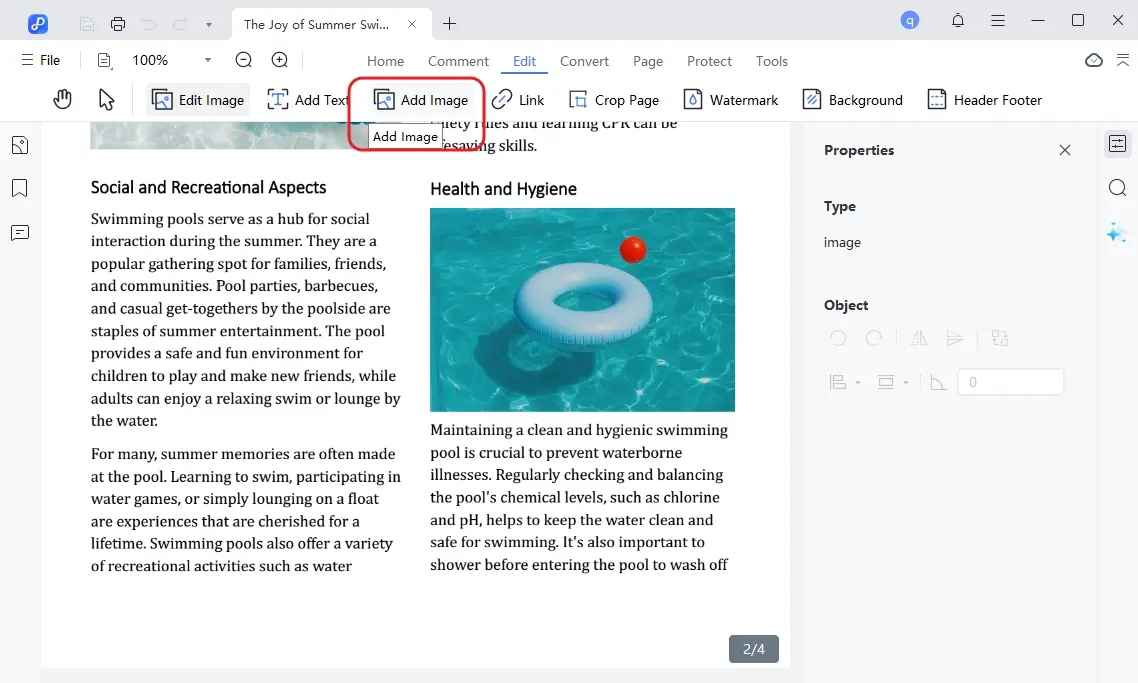
- To insert images, click the “Add Image” button and choose the image file to add.
- Once you have made all the necessary edits, click on the "Save" button in the top left corner.


Conclusion:
Having a reliable TakeFile downloader is key to getting your files quickly and tanpa hassle. When you need to bypass TakeFile premium limits, the right tools make all the difference, saving you time and frustration.
After you’ve downloaded your files, managing them efficiently is just as important. That’s why we highly recommend Tenorshare PDNob , it helps you easily edit, convert, and organize your documents, making your whole experience smoother and more productive.
Ungkapkan Pendapat Anda
lalu tulis ulasan Anda
Ungkapkan Pendapat Anda
Tinggalkan Komentar
Buat Ulasan untuk artikel dari Tenorshare
Artikel Terkait
Semua Topik


Oleh Anna Sherry
2026-01-21 / Knowledge